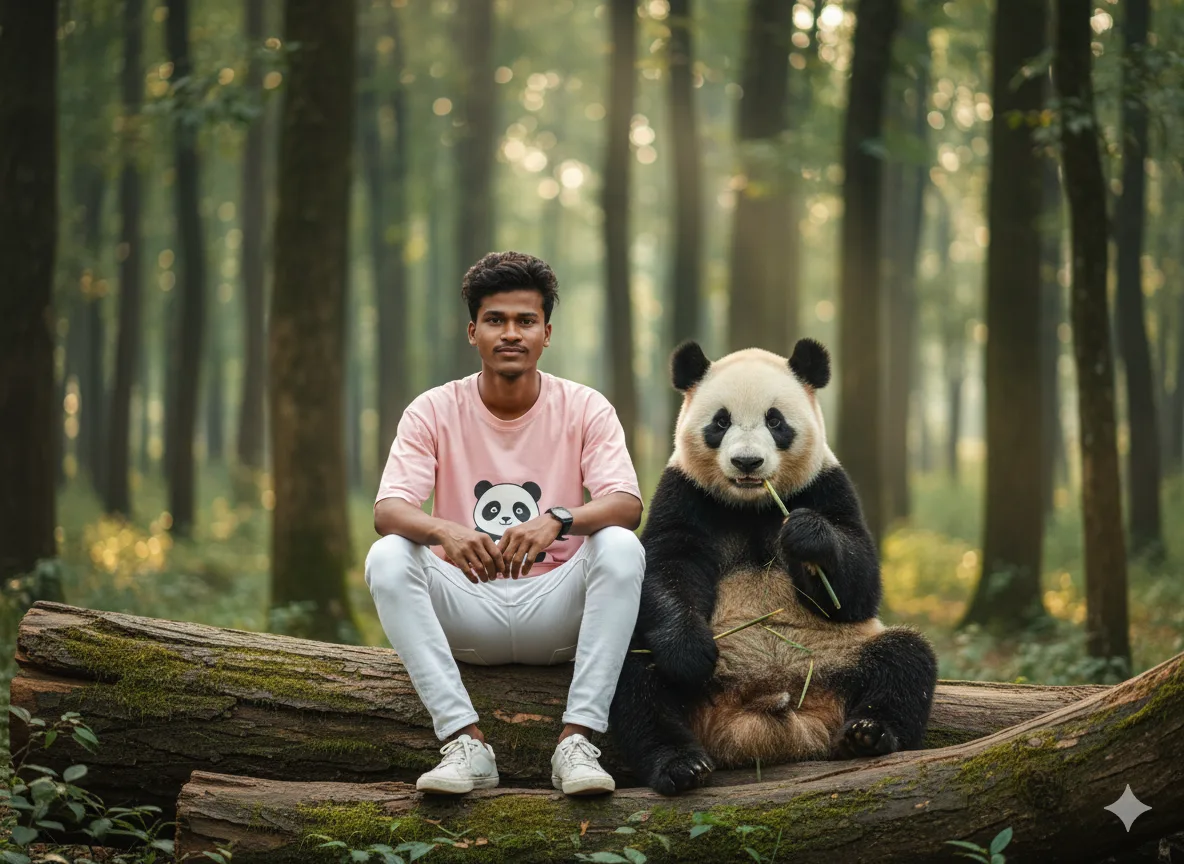
Free AI Prompt Builder for Realistic Panda Portraits

Create stunning, customizable AI image prompts instantly. No signup required. Perfect for Midjourney, DALL-E, and Google Gemini in 2025.

โœ“ 100% Free โœ“ No Sign Up โœ“ Instant Results โœ“ Beginner Friendly

๐ŸŽจ Customize Your Panda Portrait Scene

Panda Forest Reference Photo
Reference Photo

Realistic Panda Forest Style

Use the dropdowns below to customize every detail of your AI-generated panda portrait. Watch your prompt update in real-time!

โœจ Your Custom AI Image Prompt

This is your ready-to-use prompt. Copy it and paste directly into Midjourney, DALL-E, or Gemini!

Loading your customizable prompt...

โœ“ Works with all major AI platforms | โœ“ No editing needed | โœ“ Professional results guaranteed

Example Result

AI Generated Panda Forest Portrait Example - Realistic Style

Generated with AI

รขล“ยจ

Switch to Google Gemini

Want to try this prompt in Gemini? Click below, but remember to copy it first!

๐Ÿ“– How to Write AI Portrait Prompts: Step-by-Step Guide for Beginners

Never written an AI image prompt before? No problem! Follow these simple steps to create professional-quality panda portraits in minutes:

  1. 1
    Customize Your Scene

    Use the dropdown menus above to select your preferred character appearance, clothing style, and environment. Watch as your prompt updates automatically in real-time!

  2. 2
    Copy Your Prompt

    Click the large blue "Copy Prompt" button. The entire optimized prompt will be instantly saved to your clipboard - no manual copying needed!

  3. 3
    Paste to Your AI Platform

    Open your favorite AI image generator:

    • Midjourney - Premium quality, artistic results
    • DALL-E 3 - Best for precise instructions
    • Google Gemini - Fast, free access
    • Stable Diffusion, Leonardo AI, or Adobe Firefly

    Paste your copied prompt into the text box and hit generate!

  4. 4
    Optional: Refine Your Prompt

    Want to go beyond the basics? You can manually edit these elements for even more control:

    • Camera: Change "DSLR camera" to "vintage film camera" or "iPhone camera"
    • Lighting: Replace "dappled sunlight" with "golden hour" or "moonlit night"
    • Panda Action: Change "holding bamboo" to "sleeping peacefully" or "playing in water"
    • Weather: Add "misty morning" or "light rain falling"

  5. 5
    Generate & Enjoy!

    Click the generate button in your AI tool and watch the magic happen. In seconds, you'll have a stunning, realistic panda portrait created from your customized prompt!

๐Ÿ’ก Pro Tip for Beginners:

Don't worry about understanding every word in the prompt. Our templates are pre-optimized by prompt engineers to include the perfect keywords, technical details, and artistic elements for stunning results. Just customize, copy, and create!

๐ŸŽฏ What Makes a Good AI Image Prompt for Realistic Photos?

Understanding prompt anatomy helps you create better AI images. Here's what our tool automatically includes for you:

โœ“ Subject Details

Specific character features, expressions, age, and physical attributes that make your subject unique and believable.

โœ“ Clothing & Accessories

Detailed descriptions of outfits, colors, textures, and accessories that add realism and context to your scene.

โœ“ Environment & Setting

Location details, natural elements, atmospheric conditions, and environmental context that ground your image.

โœ“ Lighting & Mood

Professional lighting terms (golden hour, cinematic, dappled) and mood descriptors that create atmosphere.

โœ“ Technical Specifications

Camera settings (DSLR, 50mm lens), resolution (8K, hyper-detailed), and technical quality indicators.

โœ“ Artistic Style

Style keywords (photorealistic, cinematic, ultra-realistic) that guide the AI's artistic interpretation.

๐Ÿš€ Why Use Our Template Instead of Writing from Scratch?

  • Save Hours: Skip the learning curve. Get professional results in 30 seconds instead of spending hours learning prompt engineering.
  • Proven Structure: Our templates are tested and optimized across multiple AI platforms for consistent quality.
  • No Missing Details: We include all critical elements (lighting, composition, technical specs) that beginners often forget.
  • Beginner Friendly: No technical knowledge required. If you can click a dropdown menu, you can create professional AI art.

โ“ Frequently Asked Questions (FAQ)

How do I write AI portrait prompts for beginners?

Start by being specific about your subject, setting, and style. Use our free customizable tool to select character appearance, outfit, and environment. The tool automatically generates a detailed prompt that includes lighting, camera settings, and artistic style.

Perfect for beginners who want professional results without learning complex prompt engineering. Simply customize the dropdown menus, copy the generated prompt, and paste it into any AI image generator.

What makes a good AI image prompt for realistic photos?

A good realistic AI prompt includes:

  1. Specific subject details (age, features, expression)
  2. Detailed clothing and accessories
  3. Environment description (lighting, setting, weather)
  4. Technical specifications (camera type, lens, resolution)
  5. Artistic style keywords (photorealistic, cinematic, hyper-detailed)

Our tool automatically includes all these elements in the perfect format, ensuring you get professional-quality results every time.

Can I use this prompt generator for free without signing up?

Yes, absolutely! AIPromptBox is completely free with no registration, email signup, or hidden costs required.

Simply customize your prompt using our dropdown menus, copy it with one click, and paste it into any AI image generator like Midjourney, DALL-E, or Google Gemini. No account creation, no credit card, no limits.

Which AI platforms work with these panda portrait prompts?

Our prompts are designed to work seamlessly with all major AI image generators, including:

  • Midjourney (V5, V6, and latest versions)
  • DALL-E 3 (OpenAI)
  • Google Gemini (formerly Bard)
  • Stable Diffusion
  • Leonardo AI
  • Adobe Firefly
  • Microsoft Designer

The detailed formatting ensures consistent high-quality results across all platforms. Just copy and paste!

Why use a prompt template instead of writing from scratch?

Templates save time and guarantee results. Here's why:

  • Our templates are crafted by prompt engineers with thousands of hours of testing
  • They include optimal keywords and technical specifications that beginners often miss
  • You get professional results in 30 seconds instead of spending hours learning prompt engineering
  • Templates ensure you don't forget critical elements like lighting, composition, and camera settings
  • Consistent quality across different AI platforms - no guesswork

Think of it as using a professional photographer's settings instead of shooting on full auto. You still get to customize the subject and scene, but the technical excellence is built-in.

How do I create realistic AI photos that look professional?

The secret to realistic AI photos is in the technical details. Our prompts automatically include:

  • Professional camera specifications (DSLR, specific lenses, f-stops)
  • High-resolution indicators (8K, hyper-detailed, ultra-realistic)
  • Natural lighting descriptions (dappled sunlight, golden hour, cinematic lighting)
  • Photographic composition terms (depth of field, bokeh, wide-angle)
  • Realistic texture keywords that make surfaces look tangible

These elements combined tell the AI to create images that look like they were shot by a professional photographer, not computer-generated.

What is AIPromptBox.in and how does it help me?

AIPromptBox.in is a free AI Image Prompt Tool that helps you create and customize professional AI image generation prompts without any technical knowledge.

We provide template-based prompts that you can easily modify to generate specific types of images with AI models like Midjourney, DALL-E, and Gemini. Our platform makes AI art accessible to everyone - from complete beginners to experienced creators looking to save time.

How often do you add new prompt templates?

We regularly update our collection of prompt templates based on user feedback and emerging trends in AI image generation. We aim to add new templates at least once a month.

Current templates include panda portraits, fashion photography, urban scenes, and more. Browse all our templates to find the perfect starting point for your project.

Is there a limit to how many prompts I can generate?

No limits! You can generate and customize as many prompts as you need for your projects. Our AI Prompt Builder is completely free with unlimited usage.

Create prompts for personal projects, client work, social media content, marketing materials - whatever you need. We believe everyone should have access to powerful creative tools.

Can I modify the prompt after copying it?

Absolutely! Our templates are designed as excellent starting points, but you're encouraged to customize them further.

Common modifications include:

  • Changing lighting conditions (golden hour, overcast, night)
  • Adjusting camera equipment (film camera, phone camera, GoPro)
  • Modifying the panda's behavior (sleeping, eating, playing)
  • Adding weather effects (rain, fog, snow)
  • Changing the time of day or season

The structured format makes it easy to identify and modify specific elements while maintaining professional quality.

๐Ÿ”ฅ Explore More Free AI Prompt Templates

Discover our complete collection of professionally crafted, customizable AI prompt templates. All free, no signup required!

About AIPromptBox.in

Welcome to AIPromptBox.in, your trusted destination for creating high-quality, customizable AI prompts for image generation in 2025 and beyond.

Our mission is to democratize AI art creation by making professional-grade prompt engineering accessible to everyone - from complete beginners to experienced creators. We believe that everyone should have access to powerful tools that make AI content creation enjoyable, efficient, and rewarding.

Founded by a team of AI enthusiasts, prompt engineers, and digital artists, we understand the challenges of crafting the perfect prompt that yields the exact image you envision. That's why we've developed intuitive, customizable tools that allow you to generate professional-grade prompts with just a few clicks - no technical knowledge required.

๐ŸŽฏ Our Core Values

  • Accessibility: Making AI Prompt Builder tools approachable for everyone, regardless of technical skill level. No signup barriers, no learning curve, no hidden costs.
  • Quality: Providing well-crafted, tested prompts that deliver consistent results, like our popular Realistic Panda Photo Prompt and 40+ other templates.
  • Innovation: Continuously improving our tools based on user feedback, AI platform updates, and emerging trends in generative AI art.
  • Community: Building a space where AI creators can learn, grow, and share their experiences together. We're here to help you succeed.

Whether you're a digital artist, content creator, marketer, social media manager, or just someone exploring the possibilities of AI image generation, we're here to help you bring your creative visions to life with precision, speed, and ease.

Join thousands of creators who trust AIPromptBox.in for their AI image prompt needs. Start creating stunning AI art today!