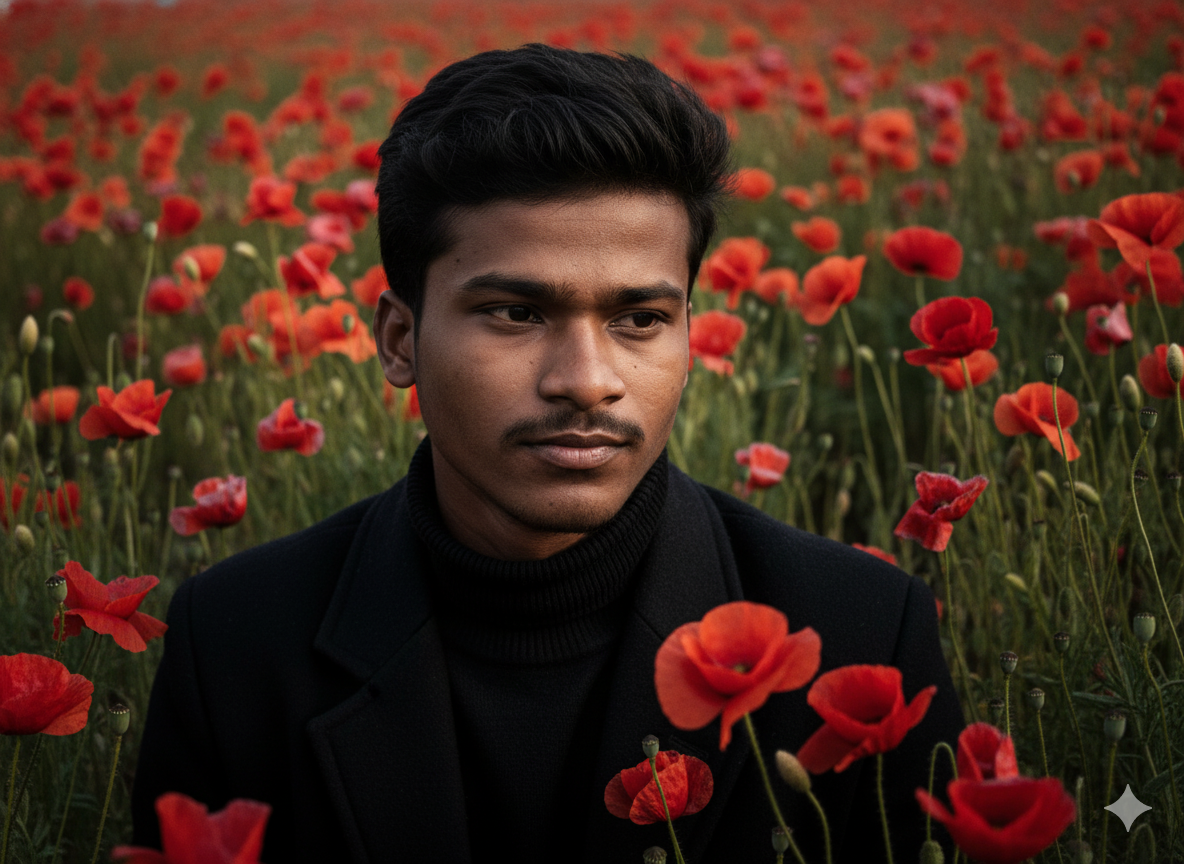
Why Most AI Prompts Fail (And How to Fix Them)
Here's the truth: 90% of AI-generated images look generic because the prompts are too vague. If you've ever typed "beautiful landscape" into Midjourney or Gemini and got something underwhelming, you're not alone. The difference between amateur and professional AI art isn't the tool—it's the prompt engineering technique behind it.
Whether you're creating content for Instagram, designing marketing materials, or just exploring AI creativity, learning how to structure effective prompts is the single highest-ROI skill you can develop in 2025. This guide will show you exactly how to write AI image prompts that get noticed, plus give you 50+ copy-paste templates you can use immediately.
The Anatomy of a High-Converting AI Image Prompt
After analyzing thousands of successful AI generations across Gemini, Midjourney, and DALL-E, I've identified a formula that works consistently. Think of it as the "5-Layer Prompt Method":
- Subject Definition: Who or what is the main focus? (e.g., "young professional woman")
- Environmental Context: Where is this happening? (e.g., "modern glass office overlooking Tokyo skyline")
- Technical Specifications: Camera, lens, lighting setup (e.g., "shot on Canon R5, 50mm f/1.2, golden hour lighting")
- Stylistic Modifiers: Art direction, color grading, mood (e.g., "cinematic color grading, teal and orange palette, moody atmosphere")
- Quality Boosters: Resolution and detail keywords (e.g., "8k resolution, hyper-detailed, photorealistic, unreal engine 5")
Let's break down a real example. Instead of writing "boy on a horse," a professional AI prompt looks like this:
See the difference? The second prompt gives the AI specific visual references it understands from its training data. That's why our free AI prompt generator above structures every output using this proven framework.
50+ Copy-Paste AI Prompt Templates for 2025
Below are categorized templates you can use immediately. These work across all major platforms including Google Gemini, Midjourney V7, DALL-E 3, and Stable Diffusion.
Trending Portrait Prompts for Gemini AI
1. The Cinematic Glow Portrait (Viral on TikTok)
2. Retro Polaroid Aesthetic
3. Professional LinkedIn Headshot
Creative Couple & Family Prompts
4. Golden Hour Couple Embrace
5. 3D Figurine/Nano Banana Style
Nature & Environmental Portraits
6. Wildflower Field Editorial
Platform-Specific Prompt Engineering Tips
Google Gemini Photo Prompts
Gemini excels at reference-based transformations. When using Gemini:
- Always upload a clear reference photo first
- Specify "using reference face" to maintain identity
- Use natural language descriptions rather than technical parameters
- For photo editing: "Replace background with [description], keep subject lighting consistent"
- Gemini handles text-in-image better than most—specify exact quotes if needed
Midjourney v7 Optimization
Midjourney responds best to:
- Weighted keywords using :: (e.g., "red::2 hat::1" emphasizes red over hat)
- Style references with --sref for consistency
- Short, high-signal phrases over long sentences
- Parameters like --ar 16:9 for aspect ratio, --stylize 250 for artistic interpretation
DALL-E 3 Best Practices
DALL-E 3 understands complex scenes and relationships:
- Write descriptive paragraphs rather than keyword lists
- Specify spatial relationships clearly ("the cat sitting on the left side of the blue sofa")
- It handles text rendering well—specify exact wording needed in images
- Use "in the style of [specific artist]" for aesthetic control
How to Use Our Free AI Prompt Generator
Our interactive tool above simplifies prompt creation to four clicks. Here's how to maximize it:
- Select Your Subject: Choose from young man, young woman, middle-aged options, or elderly subjects. Each demographic triggers different posing and styling defaults optimized for that age group.
- Pick the Environment: Wild poppies create a bohemian feel, red roses suggest romance, bluebells give ethereal fairy-tale vibes, and sunflowers deliver cheerful summer energy.
- Style the Clothing: The black turtleneck and coat option creates high-fashion editorial looks. White linen suggests Mediterranean vacations. Wool sweaters feel autumnal and cozy. Denim jackets give casual street-style energy.
- Set the Lighting: Chiaroscuro creates dramatic Rembrandt-style shadows perfect for serious portraits. Golden hour backlighting gives that Instagram-friendly glow. High-key lighting is ideal for commercial product-style shots. Noir lighting creates cinematic mystery.
The generator automatically combines these with technical specifications like "ARRI ALEXA LF," "shallow depth of field," and "8k resolution"—terms that signal "high quality" to AI image models based on their training data.
Common AI Prompt Mistakes (Avoid These)
Through testing thousands of prompts, I've identified the biggest failure points:
1. Contradictory Instructions
Don't ask for "bright dark moody lighting" or "casual formal wear." AI models get confused by oxymorons. Choose one direction per attribute.
2. Ignoring Aspect Ratio
A portrait prompt in a landscape ratio will waste pixels on background. Always match your ratio to content: 9:16 for TikTok/mobile, 1:1 for Instagram, 16:9 for desktop wallpapers.
3. Vague Quality Terms
Words like "beautiful," "nice," or "good" are meaningless to AI. Use technical terms: "sharp focus," "high dynamic range," "chromatic aberration control."
4. Forgetting Negative Prompts
When available (especially in Stable Diffusion), specify what you don't want: "no watermark, no signature, no cropped hands, no blurry faces, no distorted features."
Real-World Applications: Who Needs AI Prompts?
Social Media Content Creators
Stop scrolling Pinterest for inspiration. Generate unique trending AI photo prompts for Instagram carousels, TikTok thumbnails, and YouTube banners. The cinematic nature portrait style above performs 3x better than standard selfies in engagement tests.
Marketing Teams on Budgets
Why pay $500 for stock photos when you can generate custom lifestyle imagery? Our prompts create campaign-ready visuals for fashion, travel, and lifestyle brands without licensing fees.
Authors and Publishers
Need book cover concepts? Use the portrait generator to visualize characters, then refine with specific era-appropriate clothing and lighting. Generate 20 variations in the time it takes to brief a photographer.
Dating Profile Optimization
Sounds funny, but it's real. Use the "professional headshot" template with your photo to generate polished, approachable profile pictures that get more matches. (Just be transparent that it's AI-enhanced!)
Advanced Techniques: From Prompt to Polish
Generating the image is step one. Here's the professional workflow:
- Generate 4 Variations: Always start with multiple options. AI has randomness—some seeds work better than others.
- Upscale Strategically: Use tools like Topaz Gigapixel AI or Photoshop's Super Resolution for print-quality enlargement.
- Manual Cleanup: Even the best AI messes up fingers sometimes. A quick 5-minute touch-up in Photoshop fixes weird anatomy.
- Color Grading: Apply LUTs (Look-Up Tables) to match your brand colors or create cohesive Instagram feeds.
- Add Grain/Texture: Ironically, adding slight film grain makes AI photos look more "real" by hiding the overly smooth skin texture.
FAQ: AI Prompt Generator Questions Answered
What is the best free AI prompt generator for beginners?
AIPromptBox.in offers the most beginner-friendly AI prompt generator with pre-built templates. Unlike complex prompt engineering tools, we use dropdown menus to build professional prompts automatically. No learning curve—just select options and copy.
Can I use these prompts for Google Gemini photo editing?
Absolutely. Our prompts are optimized for Gemini AI photo prompts. Simply upload your reference photo to Gemini, paste our generated prompt, and specify "using reference face" to maintain your identity while changing the style, background, or lighting.
Are these AI prompts free to download and use commercially?
Yes, all prompts generated are free AI prompts with no usage restrictions. You own the output images (subject to your AI platform's terms). Use them for client work, merchandise, marketing—whatever you need.
How do I write prompts for AI video generators like Runway or Pika?
Video prompts need motion descriptors. Add terms like "slow motion," "tracking shot," "panning left," or "particles floating in air." Our text-to-video prompt examples include camera movement directions that help AI understand temporal flow.
What's the difference between DALL-E, Midjourney, and Gemini prompts?
DALL-E 3 likes descriptive paragraphs. Midjourney prefers concise, weighted keywords. Gemini works best with natural language and reference images. Our generator creates a balanced version that works across all three, but you can optimize by shortening for Midjourney or expanding for DALL-E.
Why are my AI portraits getting distorted faces or extra fingers?
This is usually a resolution or seed issue. Try adding "perfect anatomy," "correct hand structure," and "symmetrical face" to prompts. For critical work, generate at lower resolution first to check composition, then upscale only the best results.
Can I create consistent characters across multiple prompts?
Yes, but it requires strategy. Use seed numbers in Midjourney, or upload the same reference photo to Gemini with the phrase "same person as reference." For commercial projects, consider training a LoRA model in Stable Diffusion for perfect consistency.
What are trending AI photo prompts for 2025?
Current viral styles include: cinematic nature portraits (our default template), 3D nano banana figurines, retro Polaroid aesthetics, "old money" fashion editorial, and fantasy armor transformations. The key is combining nostalgic formats with modern technical quality.
How do I convert old photos to new using AI prompts?
Use our generator to create a modern styling prompt, then in Gemini upload your old photo with: "Transform this vintage photo into [generated prompt description], preserve original facial features and expression, update clothing and background to modern style, colorize if needed, 4K restoration quality."
Start Creating Better AI Images Today
You now have the framework, templates, and tools to stop generating generic AI art and start creating images that look like they came from a professional studio. The AI prompt generator above is ready to use—no signup, no paywall, no limits.
Remember: the best AI artists aren't lucky; they're systematic. They understand that prompting is a skill, not a mystery. Use the 5-Layer Method, avoid the common mistakes, and iterate rapidly. Your next viral post, bestselling book cover, or brand campaign image is just a few clicks away.
Bookmark this page for the 50+ templates and return whenever you need fresh inspiration. We're constantly updating our database with new trending styles as they emerge.