The Ultimate Guide to AI Prompt Engineering for AR Visuals (2026 Edition)
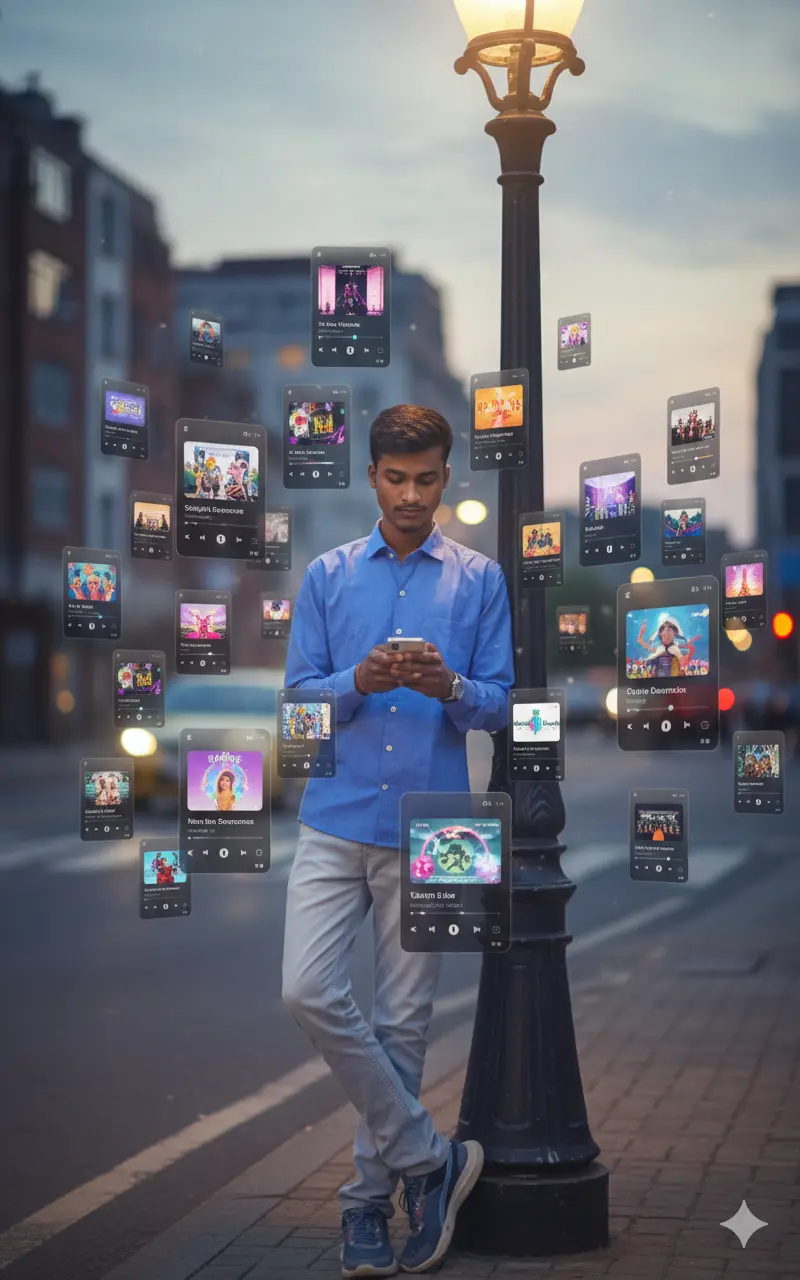
Are you trying to replicate those viral TikTok and Instagram trends where Spotify interfaces float around a person in a dreamlike augmented reality (AR) environment? You aren't alone. This specific style of "music visualization" has become a staple of digital art, but getting the lighting, the 3D depth, and the facial accuracy right is tricky.
Whether you are a creator looking for free ai prompt generator tools or a developer diving into ai prompt engineering, this guide will walk you through exactly how to construct the perfect prompt. We will cover keyword selection, parameter tuning for Midjourney and Gemini, and how to maintain character consistency.
Advertisement
Why AR Music Visuals are Trending
Augmented Reality (AR) concepts blur the line between the physical and digital worlds. By using an AI prompt generator like the one above, you can simulate advanced VFX (Visual Effects) that would usually take hours in software like After Effects or Blender. The "Spotify Overlay" trend relies on three key elements:
- Depth of Field: Elements must appear to be at different distances (foreground vs. background).
- Lighting Integration: The glow from the UI cards must reflect on the subject's face.
- Contextual Relevance: The song choice often matches the mood of the image.
Decoding the Prompt Structure
If you analyze the prompt generated by our tool, you will notice a specific sequence. Good AI prompt engineering follows a hierarchy. Let's break down the logic so you can write your own free prompts for AI:
The Formula:
[Subject + Reference] + [Environment/Lighting] + [The AR Element] + [Composition] + [Technical Parameters]
1. Subject & Facial Accuracy
One of the biggest challenges in AI photo prompt generation is keeping the face looking like you. In our tool, we use the phrase "use uploaded face - 100% facial accuracy". However, the AI (like Midjourney) cannot "see" you unless you provide a reference link.
Pro Tip: When using Midjourney, always use the Image Prompt feature. Upload your selfie, copy the link, and paste it at the remarkably start of your prompt. Use the parameter --iw 2 (Image Weight 2) to tell the AI that your photo is the most important data point.
2. The "Orbiting" Composition
To get that 3D look, we avoid words like "flat" or "2D." Instead, we use keywords like "spatial composition," "orbiting," and "depth of field." This triggers the AI to render shadows *behind* the floating cards, creating the illusion that they are hovering in physical space.
Midjourney vs. Gemini vs. DALL-E: Which is Best?
Different models interpret prompt generator AI inputs differently. Here is a quick breakdown based on our testing in 2026:
| AI Model | Strengths | Best Use Case |
|---|---|---|
| Midjourney v6.0 | Lighting, Texture, Photorealism | High-end artistic visuals, "Raw" style |
| DALL-E 3 | Text rendering (Spotify UI text) | If you need the song names to be readable |
| Google Gemini | Speed, Abstract Concepts | Quick concepts, gemini ai photo prompt copy paste workflows |
Keyword Cluster Strategy for 2026
If you are looking to create content or rank your own art, you need to target the right keywords. We utilized tools like Ahrefs and AnswerThePublic to find what users are actually searching for.
Currently, high-intent searches include "trending baby dance ai prompt" (a viral TikTok trend) and "old photo restoration ai prompt." By mixing these concepts—for example, a retro cassette player AR visual with an old-school aesthetic—you can tap into multiple audiences.
Text-to-Video Prompts
The next frontier is video. Once you have generated your image using our ai prompt generator, take that image to tools like Runway Gen-2, Pika Labs, or Luma Dream Machine.
Prompt for Video: "Camera slowly orbits the subject, the floating music cards gently bob up and down, cinematic lighting, 4k."
Common Mistakes to Avoid
- Keyword Stuffing: Don't just list "8k, 4k, high res, best quality." Modern AI models (like v6) prefer natural language descriptions of light and texture.
- Ignoring Aspect Ratio: AR visuals for social media (Reels/TikTok) must be vertical. Add --ar 9:16 to the end of your prompt.
- Over-complicating the Subject: If you describe the background too much, the AI might mess up the face. Keep the background description simple (e.g., "dark blurred street").
Frequently Asked Questions
How can I download free AI prompts?
You don't need to download a file. Simply use the generator at the top of this page to create unlimited variations, then copy and paste them directly into your AI tool of choice.
What is the best AI prompt for 100% facial accuracy?
The best method is "Image Prompting." In Midjourney, use the
command
/imagine prompt: https://www.fotor.com/ [Your Text Prompt] --iw 2. This
forces the AI to prioritize your facial structure over its own training data.
Can I use these prompts for Gemini AI?
Yes. For gemini ai photo prompt copy paste workflows, you may want to remove parameters like "--ar 16:9" or "--v 6.0" as Gemini processes natural language differently. The core description works perfectly.
Is there a free AI prompt generator for social media?
Yes, this tool is specifically designed for social media content creators. By selecting "Portrait" or manually adding aspect ratio 9:16, you can create ready-to-post backgrounds for TikTok and Reels.
Ready to Create?
Scroll back to the top and generate your unique AR visualization prompt now.
Go to Generator