🎨 Customize Your Motorcycle Scene
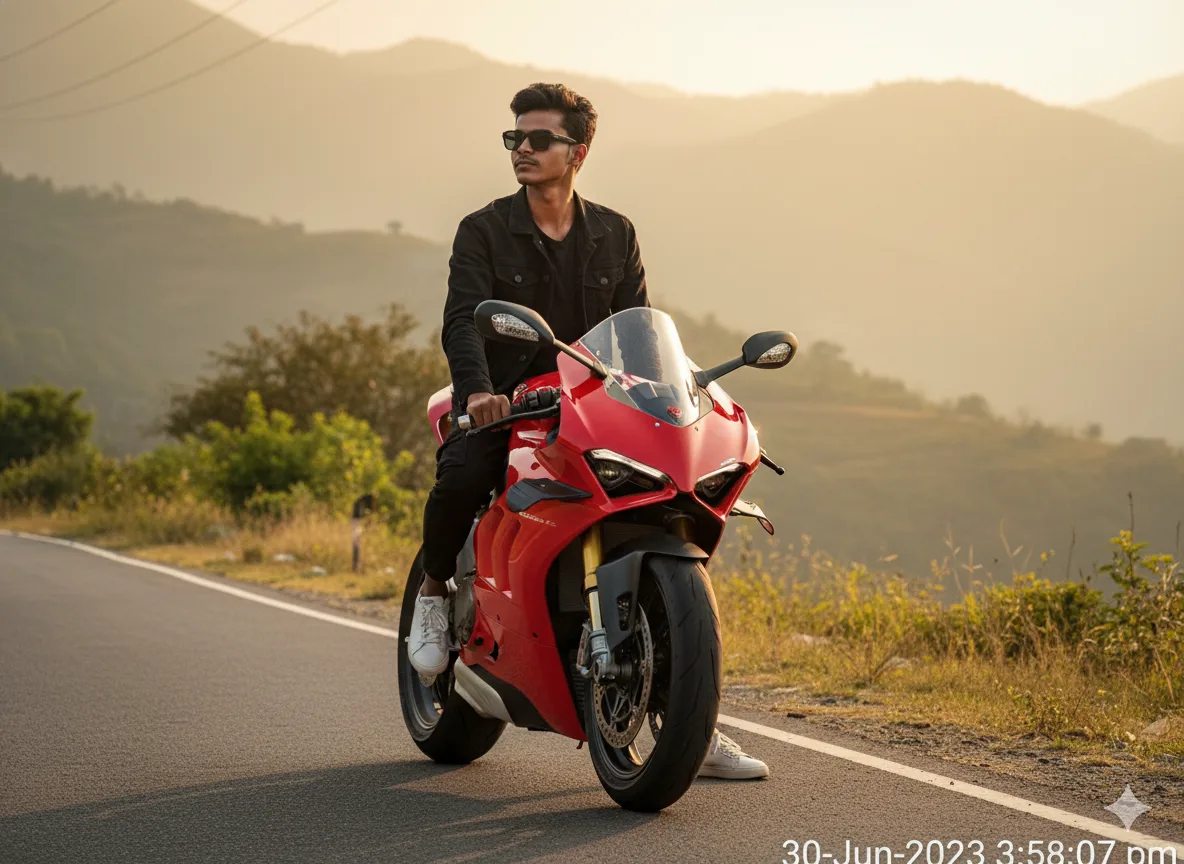
Realistic Superbike Rider Style
Choose the main character for your motorcycle portrait
Popular superbike models - you can edit for other brands after copying
Choose the rider's jacket style
Select the lower wear style for realistic motorcycle attire
💡 Pro Tip: After copying, you can manually edit the prompt to change camera type (DSLR to film camera), location (mountain to desert), or add specific details like helmet, gloves, or custom bike modifications.
Your Custom AI Prompt
✅ Ready to use with: Gemini, ChatGPT, Midjourney, DALL-E, Stable Diffusion, Leonardo.AI
Switch to Google Gemini
Want to try this prompt in Gemini? Click below, but remember to copy it first!
How to Create Perfect Motorcycle Rider Prompts (Step-by-Step)
-
1
Customize Your Scene Use the dropdown menus on the left to select your preferred character type (young man, young woman, middle-aged, or elderly), superbike model with color (Ducati, Kawasaki Ninja, Triumph, Yamaha R1), outerwear style (leather jacket, denim jacket, textile jacket), and trouser type (cargo pants, riding jeans, chinos, tactical pants). As you make each selection, watch the prompt box update in real-time with your customizations. This interactive approach ensures you see exactly what you're creating before copying.
-
2
Copy the Generated Prompt Click the large blue "Copy Prompt to Clipboard" button to instantly save the complete, professionally-formatted prompt text. The button will show a confirmation message once the prompt is successfully copied. The generated prompt includes all your selected details, proper formatting, technical photography terms, and quality descriptors optimized for AI image generators. No manual typing needed - just one click copies everything.
-
3
Paste Into Your AI Image Generator Open your preferred AI image generation platform. Popular options include Google Gemini (excellent for photorealistic images), Midjourney (best for artistic style), DALL-E 3 via ChatGPT Plus (great balance of realism and creativity), Stable Diffusion (open-source with full customization), Leonardo.AI (user-friendly interface), or Bing Image Creator (free DALL-E access). Navigate to the prompt input box and paste (Ctrl+V or Cmd+V) the entire copied text. Make sure to paste the complete prompt for best results.
-
4
Fine-Tune Details (Optional Advanced Step) For experienced users who want even more control, you can manually edit the pasted prompt before generating. Common customizations include:
- Camera changes: Replace "DSLR camera" with "vintage film camera," "mirrorless camera," or "Canon EOS 5D Mark IV with 85mm lens"
- Location swaps: Change "winding mountain road" to "desert highway," "urban city street," "coastal road," or "forest trail"
- Clothing colors: Modify "a T-shirt" to "a grey graphic T-shirt," "white henley," or "black v-neck"
- Time of day: Add "at sunset," "during blue hour," "at night with city lights," or "early morning fog"
- Additional accessories: Include "wearing a helmet," "with racing gloves," "aviator sunglasses," or "leather riding boots"
- Weather effects: Add "with dramatic storm clouds," "on a rainy day," "with lens flare," or "misty atmosphere"
-
5
Generate & Download Your Image Hit the generate or create button in your AI tool and wait 10-30 seconds (timing varies by platform and server load). Watch as the AI brings your customized motorcycle rider scene to life with ultra-realistic details, proper lighting, and cinematic composition. Once generated, most platforms let you download in high resolution (typically 1024x1024 or higher). If you're not satisfied with the first result, try generating again - AI models include some randomness, so you might get an even better variation. Save your favorite results and feel free to generate multiple versions with different customizations.
⚡ Quick Tip: AI image generation can sometimes take 2-3 attempts to get perfect results. This is normal! Each generation has slight variations. If your first image isn't quite right, adjust one or two details in the prompt and try again. Small changes can make a big difference in the final output quality.
What Makes a Great Motorcycle AI Prompt? (Expert Tips)
Creating professional-quality AI motorcycle images requires understanding the key elements that make prompts effective. Based on testing hundreds of motorcycle prompts across different AI platforms, here's what actually works:
Essential Elements
- Subject clarity: Specific age, gender, pose
- Bike details: Brand, model, color, condition
- Clothing specs: Material, style, fit, color
- Environment: Location, weather, time of day
- Technical terms: Camera, lens, resolution
- Lighting: Natural, golden hour, dramatic
Common Mistakes to Avoid
- Being too vague ("a person on a bike")
- Overly complex prompts (200+ words)
- Contradictory descriptions ("sunny" + "rainy")
- Missing camera/quality terms
- Forgetting lighting specifications
- No style modifiers (realistic, cinematic)
💡 Pro Formula for Motorcycle Prompts:
[Quality Terms] + [Subject Description] + [Motorcycle Specs] + [Clothing Details] + [Pose/Action] + [Environment] + [Lighting] + [Camera Settings]
Example: "Ultra-realistic 8K + young man with black hair + sitting on glossy red Ducati + wearing leather jacket and cargo pants + leaning forward with hands on handlebars + on mountain road during golden hour + cinematic lighting with soft shadows + DSLR camera, 85mm lens"
🤖 Compatible AI Image Generators (2024-2025)
Our motorcycle rider prompts are specifically optimized to work seamlessly with all major AI image generation platforms. Here's what you need to know about each:
🔵 Google Gemini (Nano Banana)
Best for: Ultra-realistic, photographic quality motorcycle portraits
Strengths: Exceptional realism, excellent with human faces, free to use, fast generation (10-15 seconds), great clothing texture rendering
Tip: Start prompts with "Ultra-realistic 8K" and include "Same face as reference 100%" if uploading a photo
🟣 Midjourney v6
Best for: Artistic, cinematic motorcycle scenes with dramatic lighting
Strengths: Stunning composition, beautiful lighting effects, artistic interpretation, high commercial quality
Tip: Add style parameters like "--stylize 750" or "--v 6.0" for best results. Paid subscription required ($10/month basic)
🟢 DALL-E 3 (via ChatGPT Plus)
Best for: Balanced realism and creativity, excellent prompt adherence
Strengths: Understands complex prompts well, good text rendering, integrated with ChatGPT for prompt refinement
Tip: DALL-E is very literal - be specific about every detail you want. ChatGPT Plus subscription needed ($20/month)
🟠 Stable Diffusion
Best for: Full creative control, free unlimited generations, open-source customization
Strengths: Completely free, run locally or on cloud, extensive model selection, LoRA fine-tuning for specific motorcycle brands
Tip: Use models like "Realistic Vision" or "Deliberate" for photorealistic motorcycle images. Requires some technical setup
💙 Leonardo.AI
Best for: User-friendly interface, great for beginners, fast results
Strengths: Easy to use, good free tier (150 credits/day), excellent prompt guidance, real-time canvas editing
Tip: Select "PhotoReal" or "Leonardo Diffusion XL" models for best motorcycle realism
🔷 Bing Image Creator
Best for: Free DALL-E access, no subscription needed
Strengths: Powered by DALL-E 3, completely free with Microsoft account, 15 boosts per day for faster generation
Tip: Same prompt quality as ChatGPT's DALL-E but free. Best free option for photorealistic motorcycle images
🎯 Recommendation: Start with Google Gemini or Bing Image Creator if you want free, photorealistic results. Try Midjourney for the most artistic, magazine-quality motorcycle portraits (paid). Use Stable Diffusion if you want unlimited free generations and don't mind technical setup.
🎓 Advanced Prompt Engineering Tips for Motorcycle Images
1. Mastering Lighting for Realistic Motorcycle Photos
Lighting transforms good AI images into stunning, professional-grade portraits. For motorcycles, try these lighting descriptions:
- "Golden hour lighting" - Warm, soft light just before sunset (most popular for motorcycle photos)
- "Dramatic side lighting" - Creates depth and highlights motorcycle chrome and curves
- "Overcast diffused light" - Even, professional lighting without harsh shadows
- "Backlit with lens flare" - Cinematic effect with subject silhouette and bright background
- "Studio lighting with soft shadows" - Clean, commercial photography look
2. Camera Settings That Make AI Images Look Professional
Adding realistic camera specifications tricks the AI into generating more photographic results:
- "Shot on Canon EOS R5, 85mm f/1.4 lens" - Professional portrait setup with beautiful background blur
- "Shallow depth of field, f/1.8" - Blurred background that makes subject pop
- "Wide-angle 24mm lens" - Captures more of the environment and motorcycle
- "50mm prime lens" - Natural perspective, similar to human eye
- "Shot on film, Kodak Portra 400" - Adds subtle vintage film grain and warmth
3. Environment & Background Selection
The setting makes or breaks your motorcycle portrait. Popular environment choices:
- "Winding mountain road with pine trees" - Classic motorcycle adventure aesthetic
- "Urban city street at night with neon lights" - Cyberpunk, modern vibe
- "Coastal highway with ocean view" - Freedom and adventure feeling
- "Empty parking garage with industrial lighting" - Gritty, urban style
- "Desert highway with dramatic sky" - Minimalist, wide-open aesthetic
4. Using Negative Prompts (Advanced Technique)
Some AI platforms (especially Stable Diffusion, Midjourney, and Leonardo.AI) support negative prompts - things you DON'T want:
- Negative prompt examples: "blurry, low quality, distorted face, extra limbs, watermark, text, bad anatomy, unrealistic proportions, oversaturated colors, cartoon style"
- Negative prompts help eliminate common AI artifacts and improve realism
- In Midjourney, add "--no" parameter:
--no helmet, --no background people
5. Composition & Pose Techniques
Direct the AI to create more dynamic, professional compositions:
- "Rule of thirds composition" - Subject off-center for better visual balance
- "Low angle shot looking up" - Makes motorcycle and rider look powerful, heroic
- "Side profile with motorcycle in focus" - Shows bike details clearly
- "Action shot, motion blur on background" - Creates sense of speed and movement
- "Over-the-shoulder perspective" - Immersive, puts viewer in the scene
❓ Frequently Asked Questions (FAQ)
How do I create a motorcycle rider prompt using AI?
Creating a motorcycle rider prompt is simple with our tool. First, select your preferred character type (young man, woman, elderly) from the dropdown menu. Next, choose your superbike model and color like a glossy red Ducati or sleek black Kawasaki Ninja. Then select outerwear (leather jacket, denim jacket) and trousers style. The tool automatically generates a professional, detailed AI prompt that you can copy and paste directly into any AI image generator like Gemini, Midjourney, DALL-E, or ChatGPT. The entire process takes less than 30 seconds and requires no technical knowledge or prompt engineering experience.
What AI image generators work with motorcycle prompts?
Our motorcycle rider prompts work perfectly with all major AI image generators including Google Gemini (Nano Banana), OpenAI's DALL-E 3, Midjourney v6, ChatGPT Plus (with DALL-E), Stable Diffusion, Leonardo.AI, Bing Image Creator, and Adobe Firefly. The prompts are written in a universal format that follows standard AI prompting best practices, ensuring compatibility across different platforms. For best results with photorealistic motorcycle images, we recommend using Google Gemini, Midjourney, or DALL-E 3. If you want free options, try Bing Image Creator (powered by DALL-E) or Stable Diffusion.
Can I customize the motorcycle model in the AI prompt?
Yes, absolutely! Our prompt generator includes multiple popular superbike options: glossy red Ducati (default), sleek black Kawasaki Ninja, bright yellow Triumph Street Triple, and metallic blue Yamaha R1. After copying the prompt, you can also manually edit it to specify other motorcycle brands like Harley-Davidson, BMW S1000RR, Honda CBR, Suzuki Hayabusa, Aprilia RSV4, or any custom bike model. Just replace the motorcycle description in the prompt text before pasting it into your AI image generator. You can also change colors (matte black, racing green, pearl white) or add specific details like "with custom exhaust" or "with racing livery."
How do I make my motorcycle AI images look more realistic?
To create ultra-realistic motorcycle AI images, focus on these key elements in your prompt: (1) Specify lighting conditions like "golden hour," "cinematic lighting," or "soft natural sunlight" (2) Include camera details such as "DSLR camera," "85mm lens," or "shallow depth of field" (3) Add technical terms like "ultra-realistic," "8K resolution," "photorealistic," or "highly detailed" (4) Describe the environment precisely including weather, time of day, and background elements (5) Mention textures like "glossy motorcycle paint," "leather jacket texture," or "detailed facial features." Our tool includes many of these elements automatically, but you can enhance them further by manually adding details like "with visible reflections on chrome," "natural skin imperfections," or "professional color grading."
What makes a good AI prompt for motorcycle images?
A good motorcycle AI prompt includes several essential components structured in the optimal order: (1) Character description - age, gender, pose, and facial expression (2) Motorcycle specifications - brand, model, color, and style (3) Clothing details - jacket type, pants, footwear, and accessories (4) Environmental context - location (mountain road, city street, highway), time of day, weather conditions (5) Camera settings - angle, lens type, photography style (6) Lighting - natural light, golden hour, dramatic shadows (7) Quality modifiers - ultra-realistic, 8K, cinematic, photorealistic. Our generator automatically structures all these elements in the optimal order for AI image generators, ensuring you get professional results without needing prompt engineering expertise.
Is the motorcycle prompt generator free to use?
Yes, our motorcycle rider AI prompt generator is 100% free to use with no registration, sign-up, or hidden fees required. You can generate unlimited custom prompts, copy them as many times as you need, and use them with any AI image generator. There are no daily limits, no watermarks, and no premium features locked behind paywalls. We believe AI prompt engineering tools should be accessible to everyone - from hobbyists and students to professional digital artists and content creators. The tool works directly in your browser without requiring any downloads or installations.
How do I write effective motorcycle prompts for Gemini AI?
When writing motorcycle prompts specifically for Google Gemini AI, follow these expert tips for best results: (1) Start with "Ultra-realistic" or "Photorealistic" to activate Gemini's best rendering mode (2) Specify "8K resolution" for maximum detail (3) Use the phrase "Same face as reference 100%" if uploading a reference photo of yourself or someone else (4) Include "cinematic" for professional photography style (5) Describe the motorcycle with specific brand and model names (Ducati Panigale V4, not just "red bike") (6) Add lighting details like "golden hour" or "natural sunlight" (7) Specify camera angle such as "full-body shot" or "wide-angle view." Our tool generates Gemini-optimized prompts automatically, giving you professional results every time without manual prompt writing.
Can I use these prompts for commercial projects?
You can freely use any prompts generated by our tool for any purpose, including commercial projects - the prompts themselves are completely free with no restrictions. However, the commercial usage rights for the actual AI-generated images depend on the terms of service of whichever AI image generator you use (Gemini, Midjourney, DALL-E, etc.). For example, Midjourney paid subscribers have full commercial rights to their generated images, while DALL-E and Gemini have specific commercial use policies you should review. Always check your AI platform's licensing terms before using generated images commercially in products, marketing materials, client projects, or any for-profit applications. Most platforms allow commercial use for paid subscribers but have restrictions on free tiers.
Why is my AI motorcycle image not matching the prompt?
If your AI-generated motorcycle image doesn't match your prompt, try these troubleshooting steps: (1) Be more specific - add detailed descriptions of pose, angle, and environment rather than vague terms (2) Use technical photography terms like "DSLR," "50mm lens," or "bokeh background" to get more photographic results (3) Simplify complex prompts - sometimes too many conflicting details confuse the AI (under 100 words is ideal) (4) Try different AI generators - Gemini, Midjourney, and DALL-E each interpret prompts differently and have unique strengths (5) Adjust the prompt order - put the most important elements (character, motorcycle) first (6) Use negative prompts to exclude unwanted elements in platforms that support them (7) Generate multiple variations and pick the best one. Remember that AI image generation has inherent randomness - even perfect prompts may need 2-3 attempts to get ideal results.
What's the best way to customize clothing in motorcycle prompts?
To effectively customize clothing in your motorcycle prompts, be specific about these key elements: (1) Jacket type and material - "black leather riding jacket with armor," "vintage brown leather bomber jacket," or "high-visibility textile touring jacket with reflective strips" (2) Pants style - "kevlar riding jeans with knee pads," "cargo pants with multiple pockets," or "slim-fit tactical pants" (3) Footwear - "white sneakers," "black motorcycle boots with buckles," or "racing boots with ankle protection" (4) Accessories - "aviator sunglasses," "racing gloves," "neck scarf," or "helmet (specify on or off)" (5) Colors and textures - "faded denim," "glossy leather," or "weathered cotton." Our tool provides popular preset combinations, but you can manually edit the prompt after copying to add your specific clothing details like brand names, weathering effects, or unique style elements.
Explore More AI Prompt Generators
Check out our other popular AI prompt tools for different creative needs:
👔 Men's Fashion Portrait
Create stylish men's fashion photoshoot prompts with customizable outfits and poses
💑 Cinematic Couple Portrait
Generate romantic couple scene prompts with cinema-quality lighting and composition
📸 AI Portrait Generator
Professional portrait prompts with customizable backgrounds and expressions
🎨 Realistic Portrait
Ultra-realistic human portrait prompts with perfect facial details and lighting
🏙️ Urban Fashion Style
Street fashion and urban style portrait prompts with city backgrounds
📷 Photographer Portrait
Create photographer character prompts with camera equipment and street scenes