Free AI Sherwani Prompt Generator Create Stunning Men's Indian Wedding Fashion Images

50+ Customizable AI Prompts for MidjourneyProfessional AI art generator, DALL-E, Gemini & Adobe Firefly | Perfect for Traditional Ethnic Wear Photography

✨ New for 2024: Copy-paste ready prompts optimized for the latest AI models. Create professional sherwani images in seconds!
50+
Free Prompts
100%
Free Forever
8K
Quality Output

🎨 Customize Your Sherwani AI Prompt

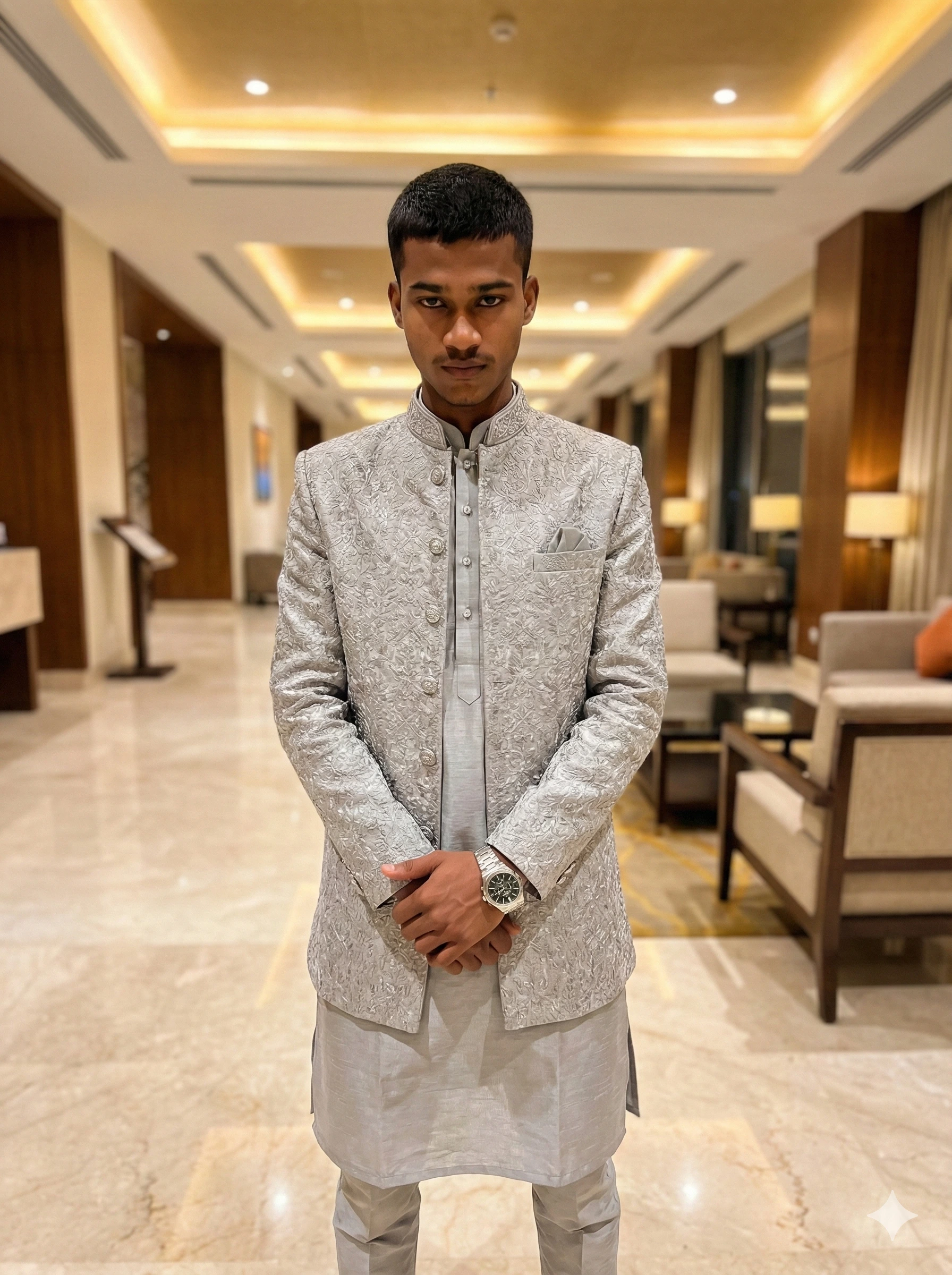
Sherwani Reference Photo
Reference Photo

Traditional Royal Sherwani Style

💡 Pro Tip: For 100% face matching, use AI tools with image upload features (Midjourney /blend, Adobe Firefly reference image, or specialized tools like Pixu.ai)

Your Custom AI Prompt

Loading your customizable prompt...

✓ Compatible with Midjourney, DALL-E, Gemini, Adobe Firefly

✓ Optimized for 8K photorealistic output

Example Result

AI Generated Sherwani Example - Royal Traditional Style

Generated with AI Prompt Box

✨

Switch to Google Gemini

Want to try this prompt in Gemini? Click below, but remember to copy it first!

Step-by-Step: How to Create AI Sherwani Images

  1. 1
    Customize Your Preferences:

    Select your desired sherwani color, fabric style, pose, background, and face features from the dropdown menus above. Each option is optimized for AI image generation.

  2. 2
    Copy the Generated Prompt:

    Click the "Copy Prompt" button. The customized AI prompt will be copied to your clipboard instantly. Watch for the success confirmation message.

  3. 3
    Choose Your AI Tool:

    Paste the prompt into your preferred AI image generator:

    • Adobe Firefly - Best for ethnic wear and traditional fashion
    • Midjourney - Professional artistic quality (Discord required)
    • DALL-E 3 - Precise details and realistic portraits
    • Gemini AI - Good for Indian cultural context
    • Canva AI - User-friendly for beginners
  4. 4
    Generate & Refine:

    Generate your image. If needed, adjust the prompt by adding:

    • "Ultra HD 8K resolution" - for maximum quality
    • "Studio lighting" - for professional photography look
    • "Shot with Canon EOS R5" - for camera-specific realism
    • Your specific facial features - for better face matching
  5. 5
    Download & Use:

    Save your AI-generated sherwani image and use it for fashion portfolios, social media, wedding invitations, product mockups, or marketing materials. Check each AI tool's commercial usage terms.

💡 Pro Tip for Face Matching: For 100% accurate face reproduction, upload a reference photo using Midjourney's /blend command, Adobe Firefly's "Structure Reference" feature, or use specialized face-swap AI tools like Pixu.ai or FastShot AI.

Frequently Asked Questions About AI Sherwani Image Generation

How do I create AI images of men wearing sherwani?

To create AI images of men in sherwani: 1) Choose your customization options (color, fabric, pose, background) from our generator above. 2) Copy the generated prompt. 3) Paste it into AI tools like Midjourney, DALL-E, Adobe Firefly, or Gemini. 4) For exact face matching, use tools that support image uploads alongside text prompts. Our prompts are optimized for photorealistic results with 8K quality output.

What are the best AI tools for generating sherwani images?

The best AI tools for sherwani image generation are: Adobe Firefly - excellent for ethnic wear and traditional fashion with realistic textures. Midjourney - best for artistic, high-quality fashion photography with cinematic results. DALL-E 3 - great for precise details and realistic portraits with accurate embroidery rendering. Gemini AI - good understanding of Indian cultural context and traditional elements. Canva AI - most user-friendly for beginners with instant results. For face-matching, use tools that allow image uploads like Midjourney's /blend command or Adobe Firefly's reference image feature.

Can I use these sherwani AI prompts for free?

Yes, all our sherwani AI prompts are 100% free to use. You can customize, copy, and paste them into any AI image generator without any cost. The AI tools themselves (like Midjourney, Adobe Firefly, DALL-E) may have their own pricing structures, but many offer free trials or limited free generations. Our prompt generator will always remain completely free for both personal and commercial use. No registration or payment required.

How can I get realistic face features in AI-generated sherwani images?

For 100% realistic face matching in sherwani images: 1) Use AI tools that support image uploads (reference images) like Midjourney's /blend command or Adobe Firefly's structure reference. 2) Provide detailed facial descriptions in your prompt (jawline shape, eye characteristics, hair style, skin tone, facial hair). 3) Add quality keywords like 'photorealistic face', 'ultra-detailed facial features', '8K portrait quality', 'professional photography'. 4) Use specialized face-swap AI tools after generation for exact matches like Pixu.ai or FastShot AI. 5) Try tools like Reface or Faceswap for precise facial mapping. For best results, combine our detailed text prompts with your reference photo in multi-modal AI tools.

What makes a good AI prompt for Indian ethnic wear?

A good AI prompt for Indian ethnic wear should include: 1) Specific garment details - sherwani style, fabric type (silk, velvet, brocade), embroidery technique (zari, zardozi, thread work). 2) Color scheme - traditional colors like maroon, royal blue, gold, emerald green with specific tones. 3) Cultural context - wedding ceremony, festive celebration, ceremonial event with appropriate formality. 4) Pose and expression - confident stance, regal posture, traditional greeting pose with natural expressions. 5) Background setting - palace interior, hotel lobby, outdoor venue, heritage location with architectural details. 6) Lighting specifications - soft natural light, golden hour glow, studio lighting, warm ambient illumination. 7) Quality modifiers - photorealistic, 8K resolution, high-detail, cinematic quality, professional photography. 8) Camera specifications - full body shot, portrait orientation, three-quarter view, specific lens effects. Our generator combines all these elements automatically for optimal AI image generation results.

Which sherwani colors work best for AI image generation?

The best sherwani colors for AI generation are: Traditional colors - Deep maroon (rich, regal, wedding favorite), Royal blue (classic, elegant, versatile), Emerald green (festive, royal, vibrant), Golden beige (premium, sophisticated), Ivory white with gold (luxury, ceremonial), Burgundy red (bold, traditional statement). Modern colors - Silver-grey (contemporary, elegant), Navy blue (professional, refined), Black with gold embroidery (formal, striking), Champagne gold (regal shimmer, unique), Wine purple (rich, distinctive). For photorealistic AI results, mention specific color tones like 'deep maroon with gold thread work' or 'ivory white with silver embellishments'. Rich, saturated colors generally generate better and more accurate results than pastel or light shades in most AI image generation tools. Always specify metallic accents (gold, silver) for authentic ethnic wear appearance.

Can I use AI-generated sherwani images for my business?

Yes, you can use AI-generated sherwani images for business, but verify each AI tool's commercial license: Midjourney - Paid subscribers ($30/month) get full commercial rights for unlimited usage. DALL-E 3 - Commercial use allowed with proper attribution when required by OpenAI terms. Adobe Firefly - Commercial use included in paid Creative Cloud plans with enterprise options. Canva Pro - Business users have comprehensive commercial rights for generated content. Gemini AI - Check Google's latest terms for commercial usage restrictions. Our prompts are 100% free for both personal and commercial use without any restrictions. Always verify the specific AI platform's current terms of service and consider adding appropriate disclaimers if using AI-generated images in advertising, product listings, or marketing materials. For fashion e-commerce, ensure generated images meet your industry's authenticity standards.

How do I customize sherwani fabric and embroidery in AI prompts?

To customize sherwani fabric and embroidery in AI prompts, specify: Premium Fabrics - Silk (lustrous, traditional, drapes well), Velvet (rich texture, royal, wedding perfect), Brocade (intricate patterns, heavy, formal), Raw silk (textured, ethnic, sophisticated), Jamawar (traditional weave, Kashmir specialty), Tissue fabric (lightweight, shimmer, festive). Embroidery Styles - Zari work (metallic thread, gold/silver), Zardozi (royal, heavy embellishment, premium), Thread embroidery (colorful, artistic, detailed), Sequin work (shimmer, party wear, contemporary), Mirror work (traditional, Rajasthani, ethnic), Stone embellishments (modern, glamorous, high-end). Detailed Descriptions - 'intricate gold zari work on collar, cuffs and front panel', 'minimal thread embroidery with floral motifs on shoulders', 'heavy zardozi embellishment covering entire front'. Pattern Styles - Floral (classic, elegant), Geometric (modern, structured), Paisley (traditional Indian), Abstract (contemporary, artistic), Traditional motifs (peacock, elephant, lotus). Our generator provides pre-configured professional combinations that work exceptionally well with all major AI image generation tools.

What background settings work best for sherwani photography prompts?

Best background settings for sherwani AI images: Indoor Luxury - Five-star hotel lobby (modern, elegant, professional), Palace interior (traditional, regal, ornate architecture), Elegant ballroom (formal event, crystal chandeliers, grand), Heritage haveli (authentic Indian, carved pillars, traditional), Marble corridor (clean, sophisticated, minimal), Grand staircase (dramatic, architectural interest, elegant). Outdoor Venues - Palace courtyard (traditional, open-air, architectural backdrop), Garden terrace at sunset (romantic, golden hour, natural beauty), Outdoor wedding venue (festive, decorated, celebratory), Heritage fort (historic, dramatic, imposing), Rooftop with city skyline (modern, urban, contemporary). Lighting Specifications - Soft natural daylight (realistic, even, flattering), Golden hour glow (warm, romantic, premium), Warm ambient lights (cozy, inviting, elegant), Studio lighting (professional, clean, commercial), Cinematic lighting (dramatic, artistic, high-end). Contextual Details - 'modern hotel lobby with soft lighting, marble floors, and contemporary furniture', 'outdoor palace terrace at golden hour with ancient architecture and city skyline', 'traditional haveli interior with carved pillars, chandeliers, and ornate decorations'. Always match background formality to sherwani style for authentic, professional results.
Are these prompts compatible with Midjourney and DALL-E?

Yes, our sherwani prompts are fully compatible with all major AI image generators: Midjourney (v5, v6, niji) - Works perfectly with our detailed descriptive style and artistic modifiers. Supports /imagine command format. Excellent for high-quality fashion photography with cinematic results. DALL-E 3 (ChatGPT Plus, Bing) - Optimized for OpenAI's natural language understanding. Best for precise details and accurate prompt interpretation. Great text-to-image accuracy. Adobe Firefly - Excellent results with our photorealistic modifiers and ethnic wear descriptions. Best for traditional fashion and cultural accuracy. Stable Diffusion (WebUI, DreamStudio) - Compatible with our keyword-rich structure. May need minor prompt engineering adjustments for optimal results. Gemini AI (Google Bard) - Outstanding for Indian cultural context and traditional elements understanding. Free access with Google account. Leonardo AI - Works well with our cinematic style and fashion photography specifications. The prompts use universal descriptive language that all AI models understand without platform-specific syntax. Minor adjustments may be needed for advanced platform-specific features like Midjourney parameters (--ar, --style) or Stable Diffusion weights.

AI Prompt Engineering Guides & Tutorials

Learn the latest techniques, tips, and strategies for effective AI prompt engineering across all major platforms. Master the art of creating stunning ethnic wear images with AI.

Prompt Mastery

10 Best Practices for AI Fashion Prompts in 2024

Discover proven techniques to craft prompts that capture ethnic elegance and traditional beauty in AI-generated fashion images.

December 2024 Read Complete Guide →
Ethnic Wear AI

Modern Sherwani Styles in AI Art: A Complete Tutorial

Explore contemporary twists on traditional sherwani attire using AI prompts. From classic to fusion styles with step-by-step examples.

November 2024 Learn More →
Midjourney Tips

How to Use Midjourney for Indian Wedding Fashion

Master Midjourney's powerful features for creating stunning Indian wedding attire images. Advanced parameters and techniques revealed.

November 2024 View Tutorial →
DALL-E Guide

DALL-E 3 for Traditional Menswear: Complete Guide

Learn how to generate photorealistic traditional menswear images using DALL-E 3. Tips for accurate fabric textures and embroidery.

October 2024 Get Started →
Face Matching

5 Ways to Get Perfect Face Matching in AI Images

Struggling with consistent faces? Learn the secrets to achieving 100% accurate face reproduction in your AI-generated fashion images.

October 2024 Discover How →
Commercial Use

Using AI Fashion Images for Your Business Legally

Navigate the legal landscape of commercial AI image usage. Licensing, attribution, and best practices for fashion businesses.

September 2024 Read Guide →